

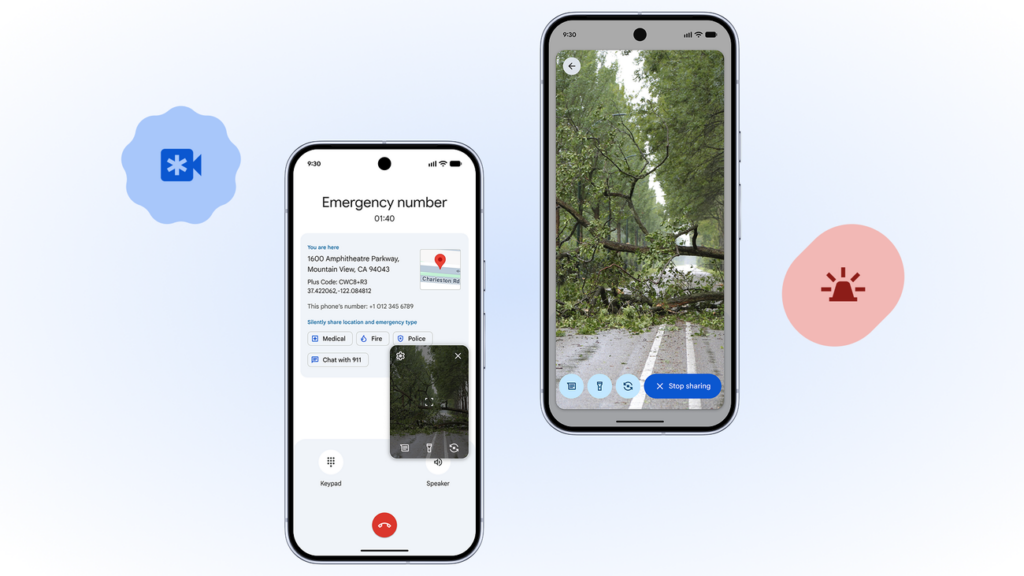
When something unexpected happens—like a car crash, a medical scare, or a dangerous situation—every second counts. Calling emergency services is already a stressful moment, and sometimes explaining what’s happening can be hard. To solve that gap, Google introduced a new feature called Android Emergency Live Video, a tool designed to help first responders understand real situations faster and more accurately.
This feature basically allows users to share live video with emergency operators during an active emergency call. Instead of struggling to describe the scene, the operator can see it instantly. And when responders can see what’s happening, they can make better decisions, send the right help, and potentially save more lives.
In this article, we’ll break down how Android Emergency Live Video works, why it matters, and how it could change the future of emergency response.
Android Emergency Live Video is a feature built into the latest versions of Android that lets users stream real-time video to emergency call centers. It works through the same system behind Emergency SOS and Emergency Location Service (ELS).
Here’s the key idea:
Instead of just sharing your location, your phone can also share real-time visuals. If operators can see the environment, the condition of a person, or the scenario you’re facing, they can make more informed decisions.
This feature is totally optional, and users must give permission before the operator can access the live stream.
Emergency situations often involve panic. People tend to speak quickly, forget details, or struggle to describe injuries or surroundings. Even with the best communication, misunderstandings can still happen.
Here are some common issues emergency services face:
Callers can’t clearly explain what they see.
Operators must guess details about injuries or threats.
Responders sometimes arrive without knowing the severity.
In loud or chaotic places, calls can be hard to understand.
With live video, many of these problems disappear. Visual information is instant, clear, and cannot be misinterpreted as easily as words.
The way this feature works is actually pretty simple and user-friendly.
When you dial your country’s emergency number (like 911, 112, 110, etc.), the system automatically checks if the call center supports Android Emergency Live Video.
If needed—like in confusing or unclear situations—the operator can ask you to share live video from your phone’s camera.
You’ll see a pop-up asking if you agree to share your camera feed. Without your approval, no video is sent.
You can choose which camera to use:
Rear camera (for showing the environment)
Front camera (if you need to show yourself)
The video is transmitted through a secure connection. It’s not saved on your phone, and call centers may have rules about recording.
Emergency Live Video has a huge range of practical uses. Here are some scenarios where it makes a big difference:
An operator can immediately see the condition of the vehicle, the severity of injuries, airbag deployment, fire risk, and other details.
People often panic when someone collapses or has difficulty breathing. Video helps responders instruct the caller to perform CPR, check vital signs, or clear airways.
If someone is stuck in a flood, fire, or natural disaster zone, live video can reveal hazards that the caller may not notice.
When safe, callers can share surroundings or suspicious activity. This helps police know how many officers to send and what dangers to expect.
Operators can guide people out of forests, mountains, or unfamiliar areas by visually identifying landmarks.
Google built this feature on top of existing emergency technologies:
This already helps send precise GPS locations to call centers. Adding video gives operators a “visual location.”
In some regions, AML improves accuracy by using Wi-Fi, cell networks, and GPS together.
The video isn’t sent through the phone call audio channel. It’s streamed via a secure internet connection (LTE, 5G, or Wi-Fi).
Google made sure that:
Video is only shared when you approve it.
Operators can only access what you choose to show.
No video is stored unless local authorities require it.
Here’s why this feature matters for everyday people:
When responders know exactly what’s happening, they can make decisions instantly.
You don’t have to describe everything—just show it.
Operators can correct mistakes during first aid or evacuation.
Seeing the scene helps responders prepare the right equipment before they arrive.
For people working in emergency call centers, this technology is a game changer. Operators can:
Distinguish between minor and serious injuries
Identify threats or hazards
Determine how many responders to send
Watch changes in real time
Provide step-by-step help more confidently
It also reduces miscommunication, which is one of the biggest challenges in emergency response.
Even though this feature is extremely helpful, it’s understandable that some users might worry about privacy.
Here are common concerns and how the system addresses them:
No. You must approve every session.
The stream uses encrypted channels similar to banking apps.
Typically, no. But some local laws might allow recordings strictly for emergency records.
Absolutely not. Video only activates with user consent and an operator request.
This feature is being rolled out gradually. It depends on:
Your phone’s Android version
Your mobile carrier
Whether your local emergency call center supports the technology
Countries in Europe, North America, and parts of Asia have already begun enabling it. More regions are expected to join soon as call centers upgrade their systems.
Android Emergency Live Video is just the beginning. Google has hinted at more advanced technologies that might appear in future updates, such as:
AI tools that detect hazards in real-time video
Automatic crash detection with video request integration
Wearable devices connecting directly to emergency video
Smarter location tracking paired with drone assistance
As smartphones become even more powerful, emergency services can become smarter, faster, and more reliable.
Android Emergency Live Video represents a major step forward in emergency communication. By combining real-time visuals with emergency calls, Google helps bridge the gap between callers and responders. The idea is simple: showing is faster than describing. And in emergencies, that difference can save lives.
With privacy protections, user-first design, and growing global adoption, this feature has the potential to become a standard part of emergency services everywhere. Whether you’re facing an accident, medical issue, or dangerous environment, having the option to share live video gives you one more tool to get help quickly and effectively.