

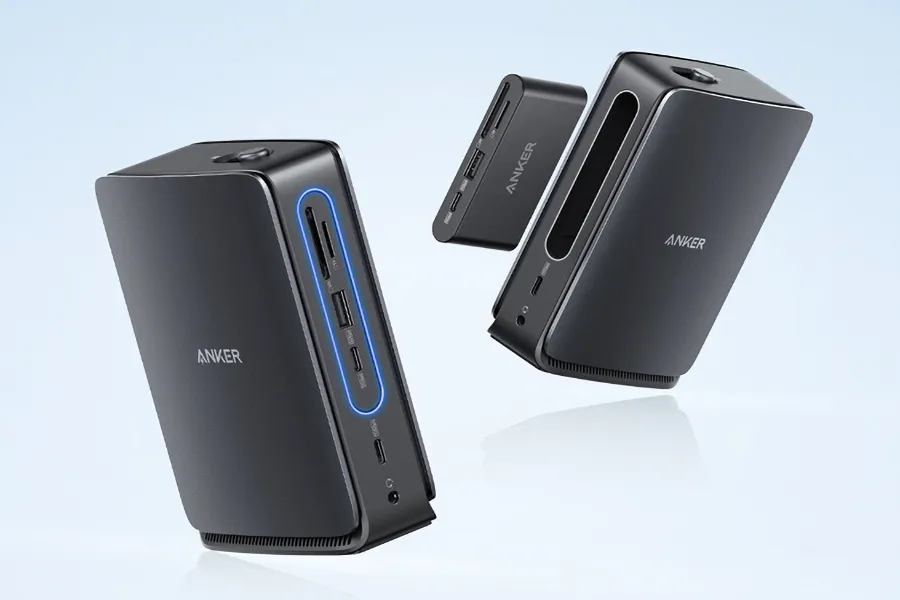
If you’ve ever tried to manage your laptop, monitor, chargers, storage drives, and accessories all at once, you know how messy things can get. Cables everywhere, ports running out, and your device overheating because everything is plugged directly into it. That’s where the Anker Nano Docking Station comes in — a small but surprisingly powerful hub designed to simplify your entire setup. In this article, we’ll break down what the Anker Nano Dock offers, why it’s gaining so much attention, and how it can actually improve your daily productivity.
The Anker Nano Docking Station is a compact USB-C hub created to expand your device’s connectivity. Think of it as a tiny command center for your laptop or tablet. Instead of plugging everything directly into your device, you plug just one cable into the dock — and the dock handles the rest.
Anker designed the Nano series to be minimal, lightweight, and ready for modern work-from-anywhere setups. Even though it’s small, it carries the power and speed of a full-size docking station.
Most editors, remote workers, designers, gamers, or students will instantly feel the difference when using it. It’s one of those tools you don’t realize you need until you try it.
In a world where laptops are becoming thinner and lighter, we’re also losing ports. Many modern devices only have two USB-C ports — sometimes one if you’re unlucky. But our workflows need more: external monitors, SSDs, microphones, mice, keyboards, SD cards, and charging.
The Anker Nano Dock solves this by giving you multiple ports, fast charging, and strong performance in a design small enough to fit in your pocket.
The biggest reasons people love it include:
Port expansion without bulkiness
Fast, stable charging up to 100W
Support for high-resolution displays
Reliable brand reputation
Easy plug-and-play setup
Travel-friendly size
For hybrid workers or digital nomads, this dock is basically a productivity cheat code.
Let’s break down the features that make this device stand out in the docking station world.
Depending on the specific Nano model, the docking station typically includes:
USB-C upstream (to your laptop)
USB-C downstream for data and fast charging
USB-A ports for traditional accessories
HDMI for external monitors
SD and microSD card slots
Ethernet port on higher-end models
This means you can connect everything you need without worrying about compatibility.
One of the main selling points is 100W passthrough charging. This allows your laptop to stay powered even when you’re running heavy tasks like video editing or coding.
Instead of plugging your charger into the wall and then using another adapter for your accessories, you get everything through one clean setup.
If you use an external monitor, the Anker Nano Docking Station has you covered. It supports resolutions up to 4K at 60Hz, which is sharp and smooth enough for:
Designers
Gamers
Video editors
Productivity users who need more screen space
With the right laptop, you can even run dual displays, making multitasking even easier.
Whether you’re moving photos, project files, or large video content, the dock supports high-speed data transfer through USB-C and USB-A ports. No more waiting minutes for a simple copy-and-paste action.
Anker is known for safety. Their charging tech includes:
Temperature control
Over-voltage protection
Short-circuit protection
Reliable power distribution
So you don’t have to worry about your devices overheating or getting damaged.
The “Nano” name isn’t just for marketing. The docking station is genuinely small and sleek. It blends well into any desk environment — modern, minimalist, or colorful.
Key design highlights:
Ultra-compact size
Premium aluminum-like finish
Lightweight for travel
Cable management-friendly
Clean and aesthetic look
It’s the kind of accessory that feels like part of your workspace instead of clutter.
Because it’s so flexible, this dock works for a lot of different user types.
If you move between home, office, and cafes, the Nano Dock keeps your setup consistent everywhere. Just plug in, and you’re ready to work.
You get:
4K monitor output
Fast SD card access
Stable power supply
It’s perfect for video editors, illustrators, photographers, and anyone working with large files.
Lightweight, affordable, and portable — great for:
Online class setups
Lecture note viewing on two screens
Charging multiple devices in dorms
Developers, analysts, and business users benefit from extra ports and smoother multitasking.
Pack one device, plug it into any laptop, and instantly recreate your workstation anywhere in the world.
The Anker Nano Docking Station is built for real productivity. Here’s what users usually experience:
No flickering, lag, or random disconnects — something cheaper hubs often struggle with.
Laptops stay powered even when multiple devices are plugged in.
SD cards and USB drives load fast, making it easier to move projects around.
Thanks to Anker’s heat management technology, the device rarely overheats even during long work sessions.
No drivers, no confusing software — plug and play.
While the market is full of USB-C docks, the Anker Nano Dock wins in a few key areas:
Better build quality
More reliable long-term performance
Stronger brand trust
Compact and stylish design
Better heat control
Wider device compatibility
For users who want something dependable, this dock offers excellent value without feeling cheap or bulky.
Every product has minor drawbacks. For the Nano Dock, the common ones are:
It may have fewer ports than very large, full-size docking stations
Not all models support dual 4K monitors
Slightly more expensive than generic brands
But for most people, the benefits far outweigh these small cons.
If you’re looking to clean up your desk setup, increase your productivity, and make your laptop more functional, the Anker Nano Docking Station is absolutely worth considering. It’s compact, powerful, safe, and versatile enough for almost any workflow. Whether you’re a student, remote worker, traveler, or creative professional, this docking station gives you everything you need in a single, tiny device.
For anyone who wants a smoother digital workspace without clutter or confusion, the Anker Nano Dock is one of the best choices on the market today.